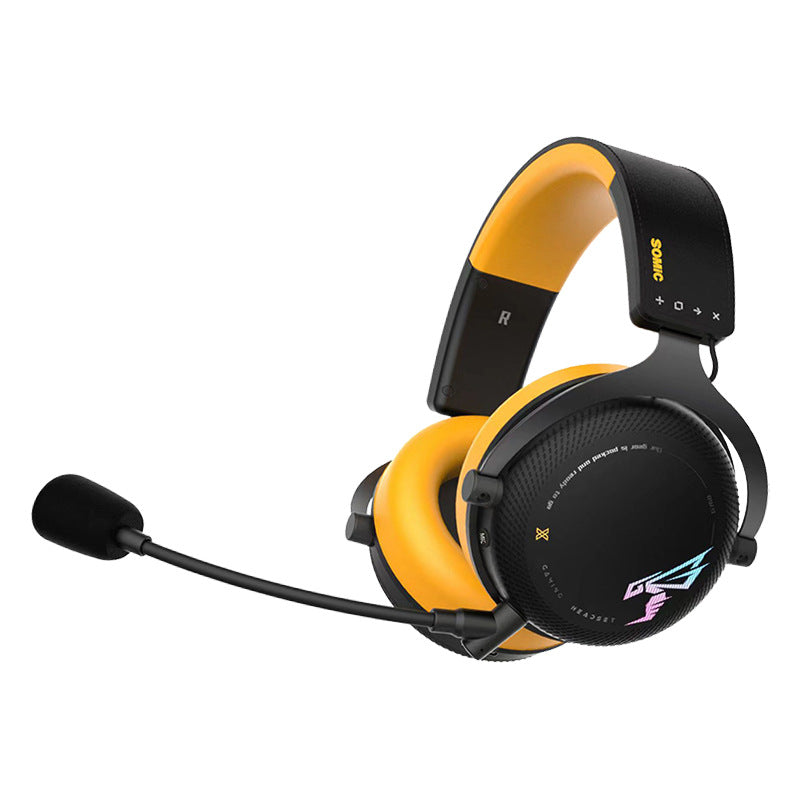
The right gaming headset starts with the right connection. The G760 Gaming Headset combines over-ear listening, cushioned earcups, 50 mm drivers, and a microphone for voice chat and calls. Your first choice is between the Wired USB and Wireless Three-Mode versions.
These are separate configurations: your order includes the version you select, not both headsets. Compare the available G760 options with the device you plan to use before choosing.
Choose the Connection First
Wired USB for a Connected Desk Setup
The Wired USB version suits a setup where a physical headset connection fits your routine. Start with your computer or console's audio-accessory guidance: a USB port alone does not establish that a device supports this headset.
Check the exact model you will connect, including how it handles headset audio and microphone input. If you are buying for a console, phone, or tablet, confirm compatibility before ordering rather than assuming that an adapter will make it work.
Wireless Three-Mode for a Wireless Configuration
If wireless use is your priority, choose the Wireless Three-Mode option only after confirming its connections match your equipment. Ask us to confirm the specific modes, any required receiver, and what accessories come with that version. The name alone does not tell you those details.
For longer sessions, also confirm battery life and charging requirements before making your choice. That gives you a clearer picture of how the headset will fit your play or work routine.
Listening and Conversation in One Headset
The over-ear design places cushioned earcups around the ears, while the microphone lets you handle voice chat and calls through the same headset. The 50 mm drivers describe the size of the audio hardware; they are not a guarantee of a particular bass response or competitive gaming advantage.
If microphone noise cancellation, a removable microphone, or a dedicated mute control is essential to you, check those requirements with us before purchase. Those are separate features from simply having a microphone.
A Practical Pre-Purchase Check
- Identify the exact device you want to connect.
- Choose Wired USB or Wireless Three-Mode deliberately.
- Confirm audio and microphone compatibility, plus any required accessories.
- Ask about fit or measurements if you have a specific requirement.
When the headset arrives, follow the directions for your selected version. Keep its version name with your order details so setup or support questions refer to the correct configuration.
View the G760 Gaming Headset at Lofty Enterprises and choose the connection that fits your setup.